
What Your Cloud Performance Metrics Are Really Telling You: Cloud Scalability Tips for the Summer Surge (Without Breaking Budgets)
Summer brings more than just sunshine—it brings serious spikes in traffic for eCommerce, travel, media, and entertainment platforms. That means your cloud infrastructure needs to be on point, or you’ll risk downtime, slow apps, and ballooning costs. Looking to keep your systems up and budgets tight? You have come to the right place. Let’s break down scaling cloud infrastructure while keeping costs firmly in check.
Why Summer Matters: Understand the Seasonal Surge
Digital demand skyrockets during the warmer months. If your app or platform supports one of these industries, you likely already know that the summer cloud traffic surge is predictable—and preventable.
Traffic comes in waves—bad planning never takes a vacation. Preparing for the summer rush shouldn’t be reactive. It should be a proactive collaboration between your engineering and finance teams to deliver affordable cloud scalability that performs under pressure.
Autoscaling 101: How to Make It Work for You
Cloud autoscaling best practices start with understanding the basics: setting thresholds, rules, and resource limits.
Thanks for clarifying! Here’s a deeper, more detailed version of that Autoscaling 101 section with expanded bullet points and context, while keeping the tone professional yet conversational:
Autoscaling 101: How to Make It Work for You
Cloud autoscaling begins with mastering three key components: thresholds, rules, and limits. Each one plays a specific role in how your cloud environment responds to traffic surges—and how well it controls costs.

At a high level:
- Thresholds: Define when to act
Thresholds are the triggers for autoscaling—metrics like CPU, memory, I/O, or latency. For example, consistently hitting 70% CPU for 2 minutes might prompt new instances. Set thresholds based on real workload behavior to act early without overreacting. - Rules: Control how scaling unfolds
Rules define how quickly and how much to scale. Should you add one instance or five? Immediately or after a delay? Smart rules account for cooldowns, warm-ups, and service dependencies to avoid cascading issues. - Limits: Keep scaling in check
Limits cap how far scaling can go, protecting your budget and system. For example, setting a max of twenty instances helps avoid surprise costs and ensures your infrastructure scales back gracefully when demand drops.
Review and adjust your autoscaling settings routinely, particularly before expected traffic spikes. What worked in February may not hold up in July, when user behavior, app updates, or business goals shift.
Use pre-summer load tests and simulations to:
- Confirm that your limits still reflect business realities.
- Validate your thresholds under projected conditions.
- Observe how rules behave under both gradual and rapid spikes.
Testing autoscaling before the heat hits is like checking your air conditioning before a heatwave—it ensures your infrastructure keeps its cool when it matters most.
Horizontal vs. Vertical Scaling: Choosing the Right Fit for Your Summer Strategy
When you’re facing fluctuating summer traffic, understanding the difference between horizontal and vertical scaling is essential to building a cloud environment that’s both responsive and cost-efficient. Each method has its role—but knowing when and how to use them is where smart engineering shines.
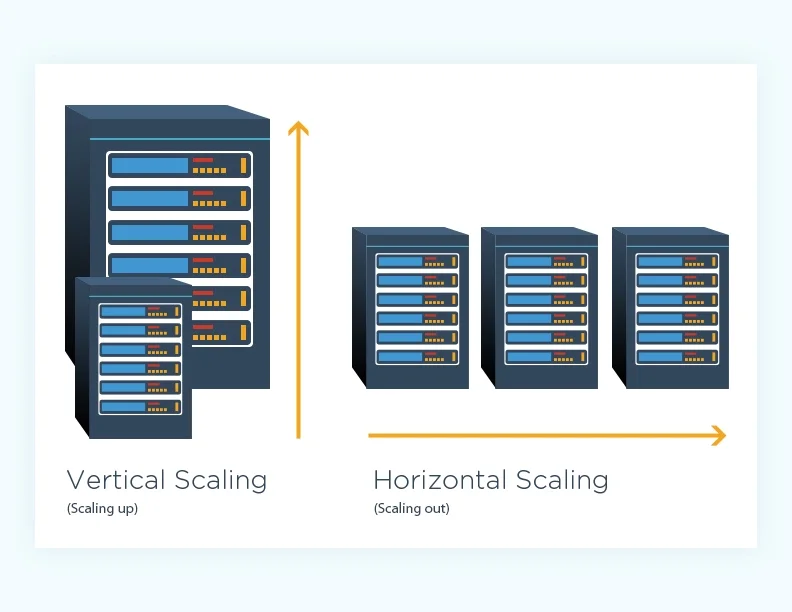
Horizontal scaling (scale-out): Scale out by adding resources to distribute the workload efficiently. This spreads traffic across multiple machines or containers. It’s ideal for web servers, stateless apps, and microservices, offering flexibility, fault tolerance, and high availability. This is key for scaling cloud infrastructure under unpredictable loads.
Vertical scaling (scale-up): Increase the power of a single instance
This means upgrading CPU, memory, or storage on one machine. It’s fast and simple—especially for monolithic or legacy systems—but has hard limits and higher cost ceilings.
Why a Hybrid Approach Is Best
Each method has trade-offs. Combining both approaches helps maintain agility while keeping costs under control.
- Use horizontal scaling as your elastic, resilient core.
- Rely on vertical scaling for quick performance gains or while transitioning systems.
- Set autoscaling triggers that accommodate both, based on metrics like CPU or memory load.
Scalability isn’t one-size-fits-all. Mixing horizontal and vertical scaling methods gives your infrastructure the flexibility to handle both the expected and the unexpected, without overspending. In a summer surge, that mix could be the difference between record-breaking performance and record-breaking downtime.
Load Balancing: Your Secret to Stability
Scaling only works when paired with proper load balancing. Even if you double your server count, uneven traffic distribution can cause one to burn out while others sit idle.
Use managed load balancers to:
- Evenly distribute traffic.
- Detect and route around failed instances.
- Support SSL termination for faster response times.
- Automatically adjust to scaling events without downtime.
- Reduce single points of failure in high-demand scenarios.
- Improve latency by directing users to the nearest healthy region.
Proper load balancing reduces risk and keeps your user experience smooth, even under pressure. It also helps prevent cascading failures during high-demand moments, protecting user experience.
Use Spot Instances and Serverless to Cut Costs
This is where cost-efficiency meets innovation. Spot instances offer steep discounts for workloads that can handle interruptions, perfect for batch jobs, rendering, or even surge-handling overflow.
Serverless platforms like AWS Lambda or Azure Functions add flexibility during demand spikes. These services adjust to demand and bill you based solely on actual usage.
Together, these tools support cloud cost management in a way traditional VMs can’t touch. Effective use of these tools can help you keep your budget right where it needs to be.
Predictive Traffic Modeling: Anticipate, Don’t React
One of the most overlooked cloud scalability tips is demand forecasting. Rather than reacting faster, it’s about planning smarter. If your team has lived through at least one high-traffic summer, you already have the raw material: historical data.
Here’s how to get ahead:
- Review logs, usage reports, and performance metrics from the past 1–3 years. Identify peak times by day, week, and region to find predictable trends.
- Marketing campaigns, product drops, and media exposure can all produce sudden surges. Take these into consideration to help plan for anticipated surge.
- Build projections using predictive modeling tools like AWS Forecast or your own BI platforms. Model different traffic scenarios (e.g., 20%, 50%, 2x increase) to test how your infrastructure might respond.
- Cross-functional visibility ensures infrastructure is ready before traffic hits, not during or after.
- If your app supports travel, events, media, or retail, consider how consumer behavior changes around national holidays, school breaks, or international events.
- Use past incidents to prioritize where you need to scale most proactively. Was it your database? API gateway? File storage?
- Tools like Locust, JMeter, or k6 can mimic predicted traffic and validate whether your system scales as modeled—or needs tuning for surge seasons.
The goal is to move from “we think it’ll be busy” to “we know what to expect and how we’ll handle it.” Predictive modeling gives you control, foresight, and the confidence to scale intentionally without overprovisioning or overspending.
Real-Time Dashboards and Alerts: Your Eyes in the Cloud
Without real-time visibility, scaling becomes guesswork. Monitoring cloud performance in real time helps catch issues before they spiral.
Tools like Google Cloud’s Operations Suite or AWS Forecast can help you build scenarios before traffic even hits. Set alerts for critical metrics like CPU, memory, latency, disk I/O, and database performance. Dashboards should be visible to both tech and ops teams to ensure transparency. This supports efforts to optimize cloud performance without constant firefighting.
Don’t Forget to Scale Down
Scaling up is exciting. Scaling down is essential.
When the surge fades, your resources—and your costs—should go with it. Set cool-down periods in your autoscaling policies and establish clear criteria for de-provisioning resources.
This step alone can save thousands by eliminating zombie infrastructure. Bonus: It also makes your architecture cleaner and more efficient long-term.
Align with Finance: Collaboration Over Cost Surprises
Don’t silo your engineering work. The best summer scalability plans are built hand-in-hand with finance. Why?
Because engineering can plan autoscaling, but finance must plan for cost scaling.
Set expectations:
- Share projected cost scenarios based on traffic models.
- Agree on budget ceilings for peak demand.
- Use FinOps dashboards to track cost-performance tradeoffs.
This alignment transforms scalability from a tech concern into a strategic advantage.

Tools to Implement These Strategies
Use enterprise-grade tools to turn plans into action:
- Auto Scaling with AWS: Streamlines instance provisioning and scales resources based on real-time demand.
- Google Cloud Operations Suite: Offers one place to track metrics, logs, and alerts across your infrastructure.
- Azure Monitor: Delivers metrics, logs, and smart diagnostics.
Pair these with your predictive models and you’ve got a proactive, cost-aware, and resilient summer strategy.
The Wrap-Up: What Your Metrics Are Really Saying
Your cloud performance metrics aren’t just numbers. They’re signals—early warnings, budget indicators, and user experience benchmarks. Listen to them now, and you won’t be scrambling later.
Here’s what the best teams are doing:
- Using past summers to plan better
- Mixing scaling methods for agility
- Monitoring like hawks with real-time data
- Automating cost controls with spot/serverless
- Communicating openly with finance
This summer, don’t just react. Lead. Let metrics guide your decisions and scalability strategies back them up.
Need help scaling smartly this summer? Let Molnii help you optimize your cloud setup before the spike hits.
Frequently Asked Questions

Keep a close eye on metrics that impact performance: CPU, memory, latency, IOPS, error rates, and throughput. This helps identify performance issues and pressure points within your infrastructure.
Watch for high latency, timeouts, error spikes, or autoscaling delays. If users notice lag or outages, you’re already behind—let metrics be your early warning.
Core metrics (CPU, memory, disk, network) are similar, but naming, dashboards, and integrations differ slightly across providers.
AWS CloudWatch, Azure Monitor, Google Cloud Operations Suite, Datadog, and Prometheus are all great options, depending on your stack and needs.
Absolutely. Identifying overprovisioned resources, inefficient code paths, or peak patterns allows you to right-size infrastructure and embrace affordable cloud scalability.


